Author: admin

  • Generative AI vs AI agents vs agentic AI

    A friend called me in June after a vendor meeting where both “AI agent” and “agentic AI” got used about nine times and defined zero times. This is roughly what I told her.

    Generative AI

    You ask it something, and it answers, then it waits for you again. ChatGPT, Claude, Gemini, the autocomplete in your email.

    It is a brilliant consultant locked in a room with no phone. Anything you slide under the door comes back well answered, but it cannot book you a flight.
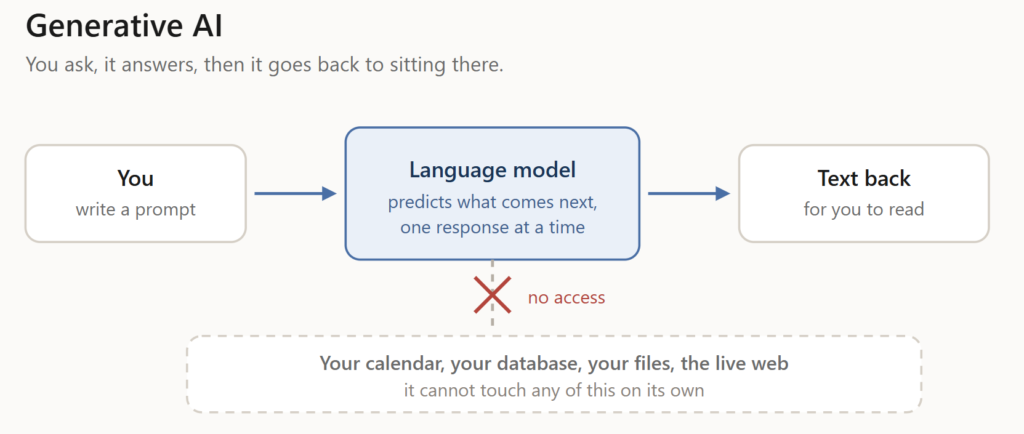
    Generative AI: you prompt, it responds, and it has no access to your systems

    Fig. 1 One turn in, one turn out. Everything outside the room stays out of reach.

    AI agents

    Same model, now with tools and a loop. The tools are its hands: search, a database, a browser, and an API. The loop is that it thinks, acts, looks at what came back, and decides what to do next.

    Coding agents show this best. Claude Code or Cursor will read your repo, make a change, run the tests, watch them fail, and fix it. You direct and review instead of typing every line.
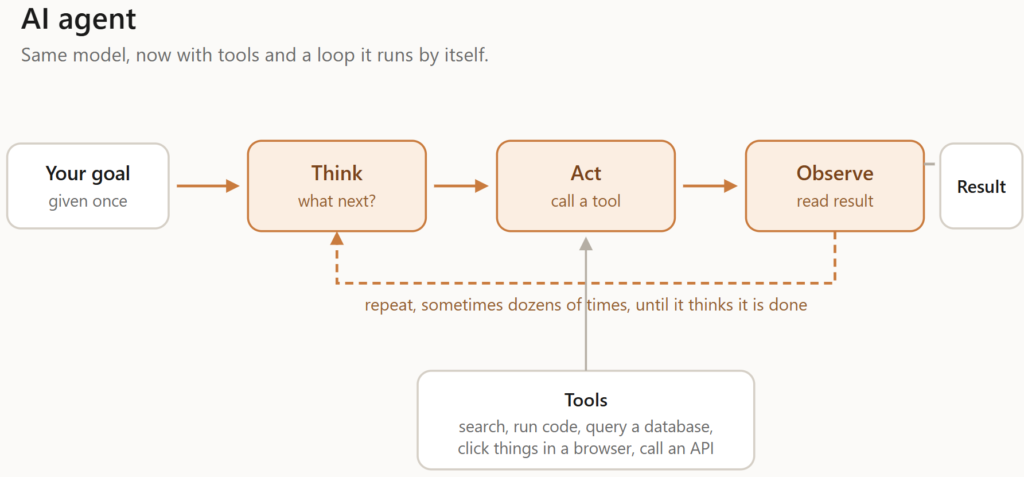
    The agent loop: think, act, observe, repeat, with tools attached to the act step

    Fig. 2 The loop is what earns it the name. A chatbot runs it once; an agent runs it until it is finished.

    Most agents are built for one job. They can be very good inside that job and no help at all outside it.

    Agentic AI

    This one is contested, so treat any confident definition with suspicion. Researchers use “agentic” as an adjective for systems that have agency, which makes it more or less a synonym for agents. Enterprise vendors use it for a layer that sits above agents, where an orchestrator splits a goal, hands the pieces to different agents, checks the results, and retries whatever failed.
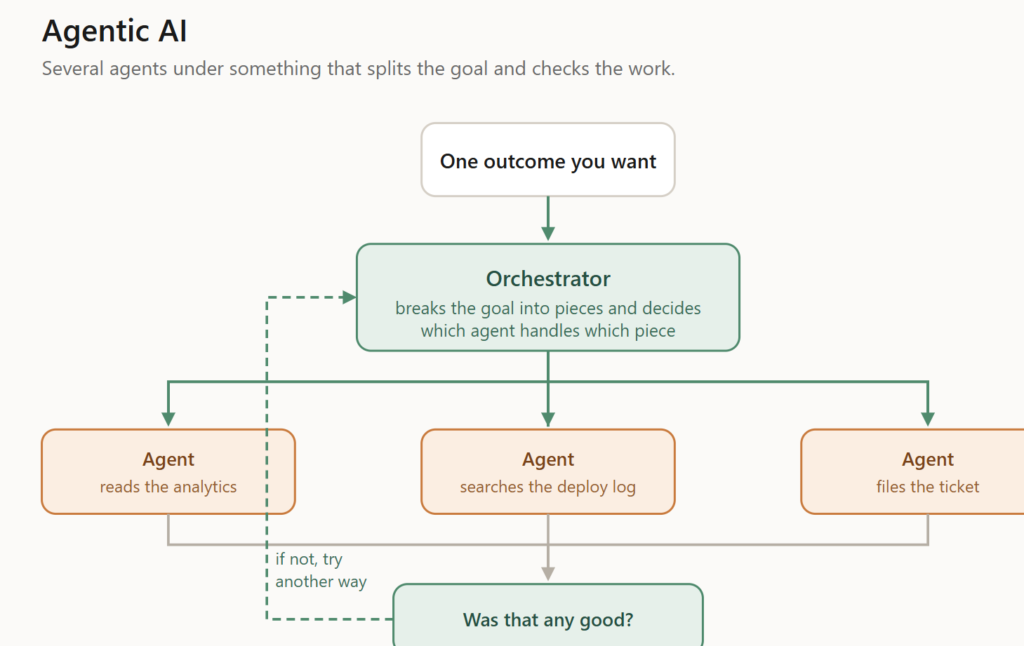
    Agentic AI: an orchestrator splits a goal across agents, then evaluates and retries

    Fig. 3 The orchestrator owns the outcome. Individual agents only own their piece of it.

    The vendor version describes something real, though. Teams keep hitting the same wall: you ship one support agent, it works, leadership asks it to also check order history and update the CRM and follow up afterwards, and the whole thing falls over. Getting that far takes a genuinely different kind of system, which is what the orchestration pitch is actually about.

    One task, three ways

    Why did signups drop last month?
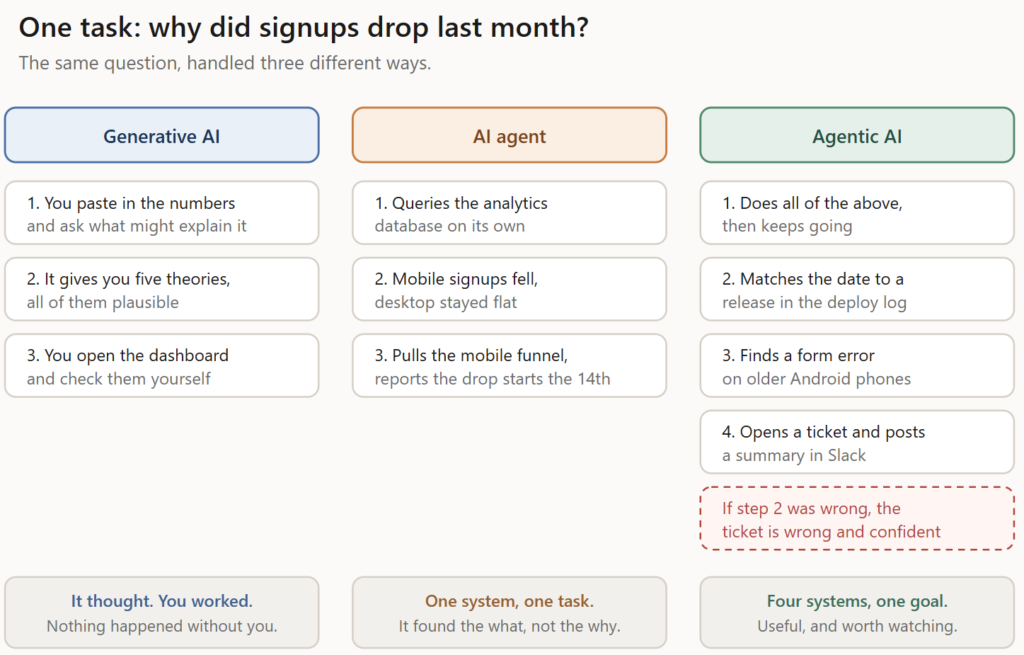
    The same signup investigation handled by generative AI, an AI agent, and an agentic system

    Fig. 4 The same question, worked by all three. Note where the human stops appearing.

    Generative AI gives you five plausible theories, and you go check them yourself.

    An agent queries your analytics, spots that mobile fell while desktop held steady, and tells you the drop starts on the 14th.

    An agentic setup keeps going from there. It matches the 14th to a release, finds a form error on old Android builds, opens a ticket, and posts it in Slack. That is a real day of work done for you. It is also how you end up with a confident, well-written, completely wrong ticket that twelve people have already read.

    Skip the labels, ask what it can do

    Everyone is talking about AI agents and agentic AI as though the label settles something. It does not. Two questions tell you far more: what can it reach, and how long does it run before a person looks at what it did?

    An “agentic platform” that can only read from one database is fairly tame. A quiet little agent with write access to your production systems is a different conversation entirely, and the branding gives you no clue which one you are being sold.

    So when someone pitches you an agent, skip what they call it and ask:

    • What can it reach?
    • What can it change?
    • How long does it run before a human checks?
    • Where does it need approval before acting?

    A simple agent with production write access is more dangerous than a powerful platform that can only read.

    Which of these do you weigh most in practice: permissions, autonomy, or oversight? For me it is the first two together, which is where this gets interesting.
  • OpenShift Virtualization: running VMs and containers on one platform

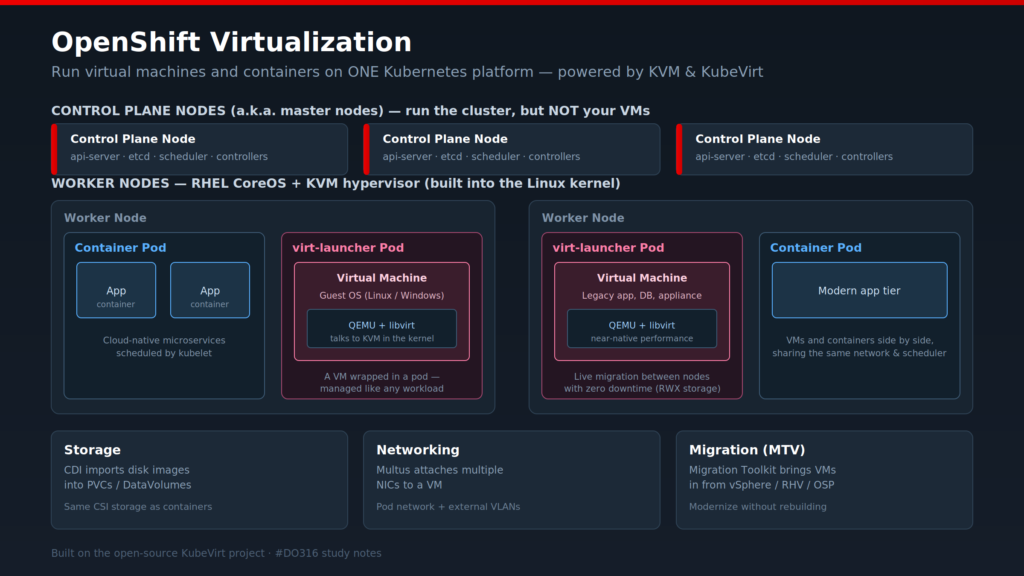
    OpenShift Virtualization (built on the open-source KubeVirt project) lets you run traditional VMs directly on OpenShift, right next to your containers. Same control plane, same API, same RBAC, same GitOps pipeline. There’s no separate hypervisor cluster to run and no second team to staff for it.

    The part that took me a while to accept is how a VM actually runs.

    A VM lives inside a special pod called virt-launcher. Inside that pod, QEMU and libvirt talk to KVM, the hypervisor that’s already built into the Linux kernel on every RHEL CoreOS node. Because KVM sits in the kernel, the VM gets close to native performance. It’s real virtualization, not emulation. And as far as Kubernetes is concerned, that VM is just another workload, so it inherits scheduling, monitoring, and networking for free. You define it as kind: VirtualMachine and manage it in YAML, the same way you’d manage a deployment.

    A few pieces make it usable in production:

    Storage: The Containerized Data Importer (CDI) pulls disk images into PVCs, using the same CSI storage your containers already use.

    Networking: Multus attaches extra NICs to a VM, so it can sit on the pod network and still reach external VLANs.

    Live migration: you can move a running VM between nodes with no downtime, as long as your storage supports ReadWriteMany.

    Migration Toolkit for Virtualization (MTV): imports existing VMs from vSphere, RHV, or OpenStack.

    So why does this matter? Most companies aren’t close to fully containerized, and they won’t be for years. Databases, legacy apps, and appliances still live in VMs and aren’t going anywhere soon. OpenShift Virtualization means you don’t have to pick a side. You modernize gradually on one platform instead of paying for and running two separate stacks. With everything happening in the traditional virtualization market lately, a lot of teams are looking hard at exactly this.

    If you’re running OpenShift Virtualization in production, I’d like to hear what caught you off guard.

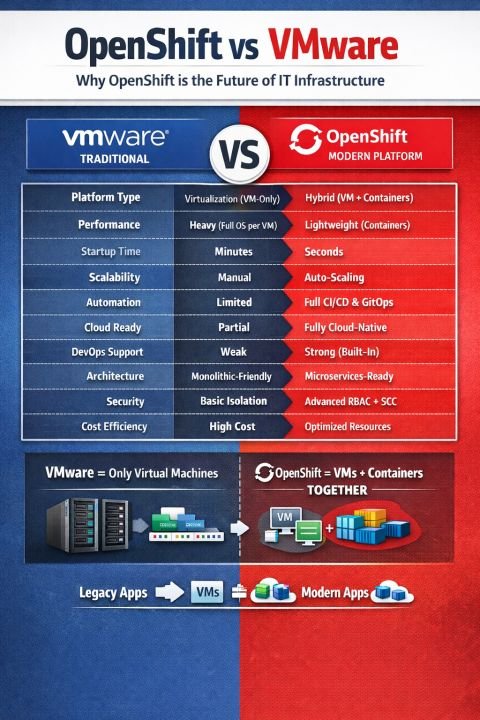
  • The infrastructure landscape is evolving rapidly.

    Traditional virtualization platforms like VMware solved critical problems in the past. But modern applications demand:

    ✔️ Scalability

    ✔️ Automation

    ✔️ DevOps integration

    ✔️ Cloud-native architecture This is where OpenShift stands out.

    👉 With OpenShift Virtualization (KubeVirt), organizations can run both VM-based legacy workloads and containerized applications on a unified platform. This is not just an upgrade. it’s a strategic transformation.

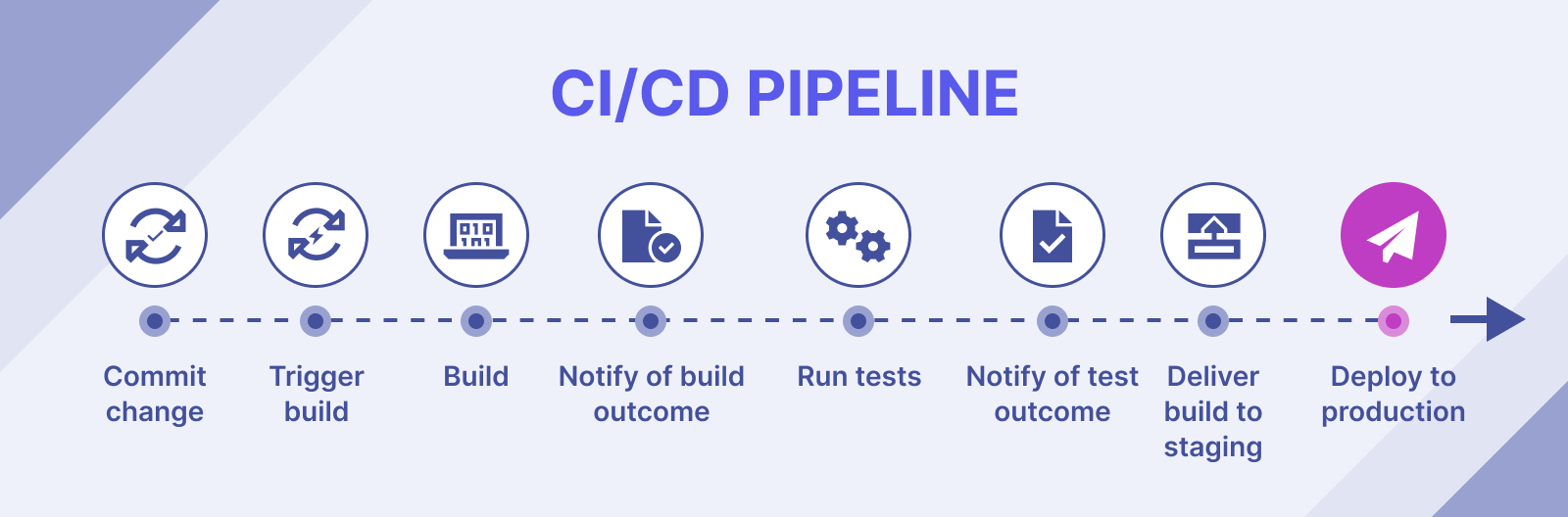
  • CI/CD Pipelines for Cloud-Native Applications

    CI/CD Pipelines for Cloud-Native Applications

    Build efficient CI/CD pipelines for faster and reliable deployments.

    Continuous Integration and Continuous Deployment (CI/CD) are essential for modern software development. They enable teams to deliver updates quickly while maintaining quality and reliability.

    This post explores how to design and implement CI/CD pipelines for cloud-native applications. From integrating testing to automating deployments, you’ll learn how to streamline your workflow and accelerate development cycles.

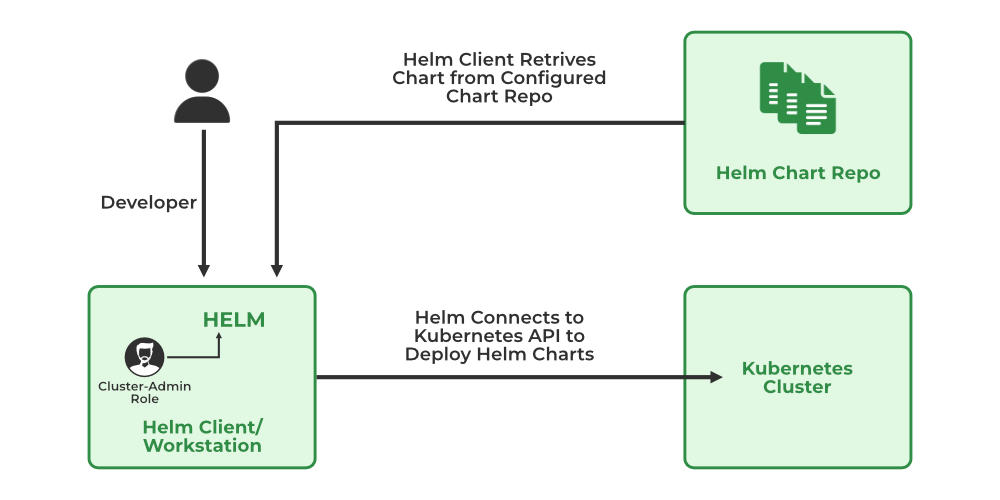
  • Introduction to Helm: Simplifying Kubernetes Deployments

    Introduction to Helm: Simplifying Kubernetes Deployments

    Manage Kubernetes applications easily using Helm charts.

    Deploying applications manually in Kubernetes can be repetitive and complex. Helm simplifies this process by allowing you to package applications into reusable charts, making deployments faster and more consistent.

    In this guide, you’ll learn how Helm works, how to create and use charts, and how it simplifies application management. Whether you’re deploying simple apps or complex systems, Helm can save time and reduce errors.

  • Securing Kubernetes Clusters: Best Practices

    Learn how to secure your Kubernetes environment against common threats.

    Security is a critical aspect of running applications in Kubernetes. Misconfigurations, exposed endpoints, and weak access controls can leave your cluster vulnerable to attacks. Implementing strong security practices is essential to protect your infrastructure and data.

    This post covers key areas such as role-based access control (RBAC), network policies, secret management, and container security. By following these practices, you can significantly reduce risks and build a secure Kubernetes environment.